Modern RAG (With a Small, Real Code Example)
I've built RAG pipelines that looked great in demos and fell apart in production. Here's what actually changed when I built it the modern way — with the code that runs it.
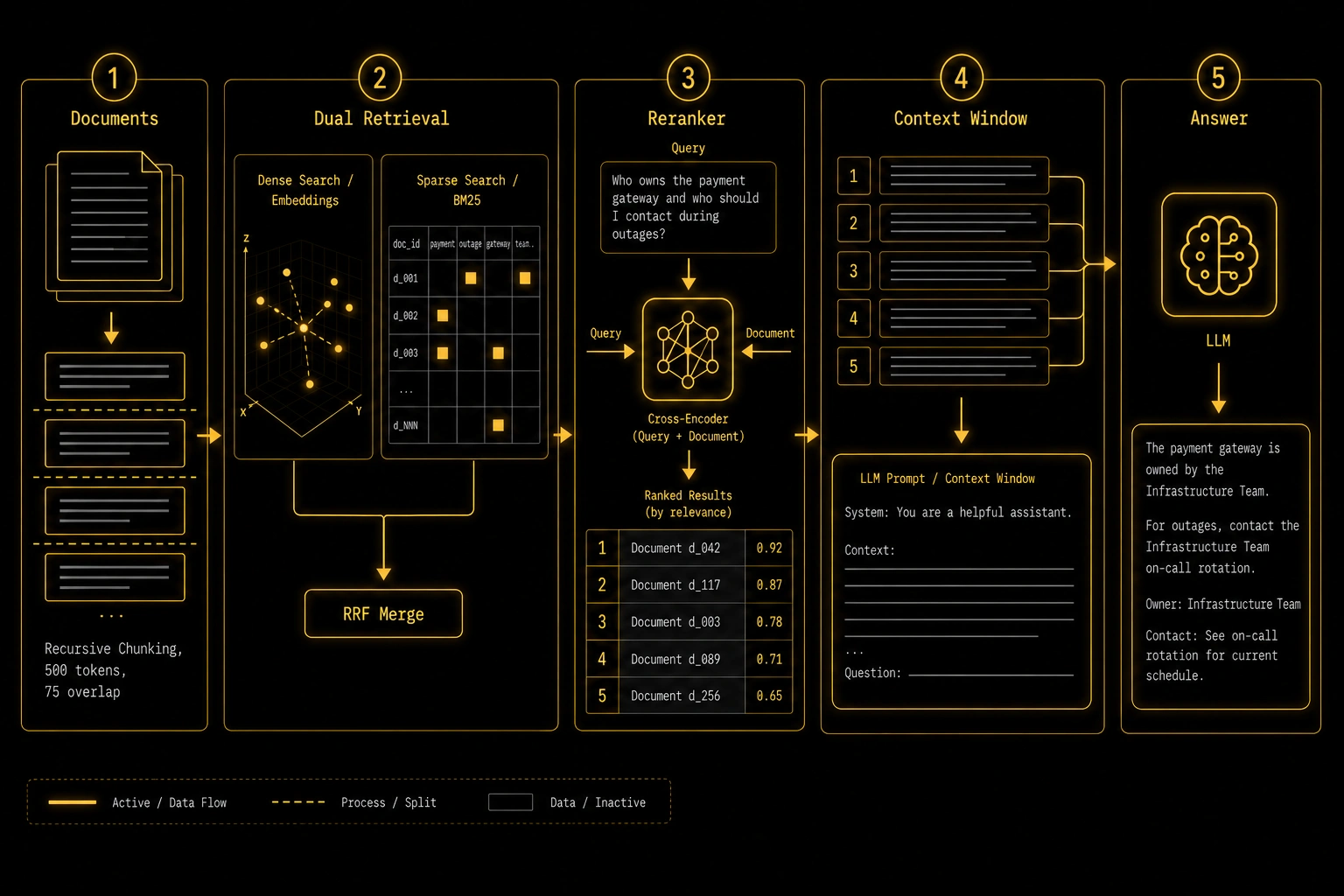
Modern RAG (With a Small, Real Code Example)
The first RAG system I built felt like a triumph. Chunk the documents, embed them, dump them into a vector store, retrieve top-k at query time, pass to the LLM. It worked in my tests. It worked in the demo. I shipped it.
Within two weeks I had five different people telling me the system was broken.
It wasn't broken in the obvious sense — it was returning answers. But the answers were wrong in ways that were hard to pin down. Sometimes the retrieved chunks were about the right topic but from the wrong document. Sometimes the answer was completely confident but the retrieved context barely mentioned what was asked. One user searched for a specific product code — PRD-2841 — and the system returned three chunks about product management philosophy, none of which contained the code.
That last one broke my brain until I understood why: dense vector search is terrible at exact string matching. "PRD-2841" embedded looks like random characters. BM25 would have found it instantly.
I spent the next few months rebuilding that system properly. This post is what I learned — with the code that actually runs.
Why Naive RAG Breaks in Specific, Predictable Ways
Before the solution, the failures are worth understanding precisely, because they determine which fixes you actually need.
Fixed-size chunking is surprisingly harmful. I was splitting at 512 tokens, which sounds reasonable. But a technical document has sections. A paragraph that starts "However, the exception to this rule is..." is completely meaningless without the sentence before it in the prior chunk. My chunks were contextually orphaned and the LLM was doing its best with incomplete information.
Dense retrieval misses exact matches. This one surprised me the most. If your documents contain product codes, version numbers, proper nouns, or any specific identifiers, cosine similarity on embeddings will often miss them. Embeddings are trained to capture semantic similarity — "v2.3.1" and "version two point three one" may or may not land close together depending on the model. A simple keyword index would have caught it every time.
Top-k without reranking is a lottery. I was returning top-5 chunks and passing all five to the LLM. But the retriever is an approximate nearest neighbor search — it's optimized for speed, not precision. Positions 2 and 3 could be significantly less relevant than position 1, or the most useful chunk could be sitting at position 8. Without a second-pass reranker that actually reads the query against each candidate, you're gambling on the retriever's imprecision.
The prompt wrapper matters enormously. I learned this embarrassingly late. Two prompts can receive identical retrieved context and produce dramatically different quality answers. The phrasing, the instruction about what to do when context is insufficient, whether you tell the model to cite sources — all of it matters. I've seen a prompt change improve answer quality by 20% with zero changes to the retrieval pipeline.
What Modern RAG Actually Adds
Here's the honest comparison:
| Stage | Naive | Modern |
|---|---|---|
| Chunking | Fixed 512 tokens, no overlap | Recursive by natural separators, 50–100 token overlap |
| Retrieval | Dense only (embeddings) | Hybrid: dense + BM25, merged with RRF |
| Ranking | Top-k from retriever | Reranked by cross-encoder |
| Query | Raw user input | Optional rewrite for short/ambiguous queries |
| Context window | All chunks concatenated | Ranked, trimmed, with deduplication |
You don't need all of these on the first day. But knowing they exist means you know where to look when something breaks.
The Code
Here's a minimal but real implementation. This is not a toy — I've used this structure as the foundation for production systems. I'll walk through each part and explain the decisions that aren't obvious.
Install:
pip install langchain langchain-community langchain-chroma chromadb rank-bm25 anthropic cohereStep 1: Chunking — recursive by separators, with overlap
from langchain.text_splitter import RecursiveCharacterTextSplitter
from langchain_community.document_loaders import TextLoader

loader = TextLoader("your-document.txt")
documents = loader.load()

splitter = RecursiveCharacterTextSplitter(
    chunk_size=500,
    chunk_overlap=75,
    separators=["\n\n", "\n", ". ", " ", ""],
)
chunks = splitter.split_documents(documents)
The separator list is the key detail here. The splitter tries "\n\n" first (paragraph break), then "\n", then sentences, then words. It only falls back to the next separator if the chunk is still too large. This means your chunks almost always break at a natural boundary.
The chunk_overlap=75 means consecutive chunks share 75 tokens of content. This prevents the orphaned-context problem where a sentence at the end of chunk 3 needs the beginning of chunk 3 to make sense, but the query retrieves chunk 4.
Step 2: Vector store
from langchain_chroma import Chroma
from langchain_community.embeddings import HuggingFaceEmbeddings

embeddings = HuggingFaceEmbeddings(model_name="BAAI/bge-small-en-v1.5")
vectorstore = Chroma.from_documents(
    chunks,
    embedding=embeddings,
    persist_directory="./chroma_db",
)
I'm using bge-small-en-v1.5 here instead of OpenAI embeddings for two reasons: it's free to run locally, and for most retrieval tasks it's competitive with models 10x more expensive. The bge family from BAAI is genuinely excellent and underrated.
One thing I learned the hard way with Chroma: always set persist_directory. Without it, the database lives in memory and disappears when your process ends. I lost an indexed corpus this way once because I forgot it.
Step 3: BM25 index for sparse retrieval
from rank_bm25 import BM25Okapi
import numpy as np

corpus_tokens = [chunk.page_content.lower().split() for chunk in chunks]
bm25 = BM25Okapi(corpus_tokens)
This is the part most tutorials skip that I wish I'd known about from day one. BM25 is a classic keyword-matching algorithm. It doesn't understand semantics — it just scores documents by how often the query terms appear, weighted by how rare those terms are across the corpus. For exact string matches, version numbers, product codes, proper nouns — it beats embeddings reliably.
Step 4: Hybrid retrieval with Reciprocal Rank Fusion
def hybrid_retrieve(query: str, top_k: int = 20) -> list:
    # Dense retrieval
    dense_docs = vectorstore.similarity_search(query, k=top_k)

    # Sparse retrieval (BM25)
    tokenized = query.lower().split()
    bm25_scores = bm25.get_scores(tokenized)
    top_indices = np.argsort(bm25_scores)[::-1][:top_k]
    sparse_docs = [chunks[i] for i in top_indices]

    # Reciprocal Rank Fusion to merge rankings
    def rrf_score(rank: int, k: int = 60) -> float:
        return 1.0 / (k + rank)

    scores: dict[str, float] = {}
    doc_map: dict[str, object] = {}

    for rank, doc in enumerate(dense_docs):
        key = doc.page_content[:100]
        scores[key] = scores.get(key, 0) + rrf_score(rank)
        doc_map[key] = doc

    for rank, doc in enumerate(sparse_docs):
        key = doc.page_content[:100]
        scores[key] = scores.get(key, 0) + rrf_score(rank)
        doc_map[key] = doc

    ranked = sorted(scores.items(), key=lambda x: x[1], reverse=True)
    return [doc_map[key] for key, _ in ranked[:top_k]]
Reciprocal Rank Fusion is the right way to merge ranked lists from different retrieval methods. The formula 1 / (k + rank) gives higher weight to top-ranked results from either list, and the k=60 constant dampens the impact of very highly ranked results so one strong match from one retriever doesn't dominate everything.
Simply concatenating dense and sparse results and deduplicating works but is less principled. RRF consistently outperforms naive merging in my experience.
Step 5: Reranking
import cohere

co = cohere.Client("your-cohere-api-key")

def rerank(query: str, docs: list, top_n: int = 5) -> list:
    texts = [doc.page_content for doc in docs]
    response = co.rerank(
        query=query,
        documents=texts,
        top_n=top_n,
        model="rerank-english-v3.0",
    )
    return [docs[r.index] for r in response.results]
The reranker is a cross-encoder — a model that reads the query and each candidate document together and scores their relevance. The retriever (dense or sparse) never actually reads the documents against the query; it compares vector representations. The reranker actually reads both and produces a real relevance judgment.
In my testing, adding a reranker is the single highest-leverage change you can make to a naive RAG system. I've seen it take a system that users complained was "often wrong" to one that users called "pretty reliable." The Cohere reranker has a free tier that's enough for building and testing.
The pattern is: retrieve 20 candidates cheaply, rerank them with precision, keep the top 5. The final top 5 are dramatically better than what the retriever would give you at top-5 directly.
Step 6: The full pipeline
import anthropic

client = anthropic.Anthropic()

SYSTEM_PROMPT = """You are a helpful assistant that answers questions based strictly on the provided context.

Rules:
- Only use information from the context to answer
- If the context doesn't contain enough information to answer, say exactly that
- Quote or reference specific parts of the context when relevant
- Do not speculate or add information not present in the context"""

def answer(query: str) -> str:
    candidates = hybrid_retrieve(query, top_k=20)
    top_docs = rerank(query, candidates, top_n=5)

    context = "\n\n---\n\n".join(
        f"[Source {i+1}]\n{doc.page_content}"
        for i, doc in enumerate(top_docs)
    )

    message = client.messages.create(
        model="claude-sonnet-4-6",
        max_tokens=1024,
        system=SYSTEM_PROMPT,
        messages=[
            {
                "role": "user",
                "content": f"Context:\n{context}\n\nQuestion: {query}",
            }
        ],
    )
    return message.content[0].text
Two things worth pointing out in the prompt design: the numbered source labels ([Source 1], [Source 2]) give the LLM a clean way to reference where information came from. And the explicit "say exactly that" when context is insufficient is important — without it, models tend to speculate and dress it up as a real answer.
The Failure I Still See Constantly
Even with all of this, there's one failure mode that trips people up constantly: bad chunking for structured content.
If your documents include tables, code blocks, numbered lists, or formatted data — the RecursiveCharacterTextSplitter will often butcher them. A table split in the middle is worse than useless; it looks like content but the LLM can't parse it correctly.
For structured content, you need document-type-aware chunking. For Markdown, split at heading boundaries. For code, split at function or class boundaries. For PDFs with tables, extract tables separately and store them as their own chunk type with metadata indicating it's structured data.
This is the part of RAG that nobody's built a clean universal solution for yet. Most production systems I've seen have custom chunking logic per document type, which is messy but necessary.
What to Actually Build First
If you're building your first RAG system:
Start with the naive version. One file, one embedding model, Chroma with no persistence, top-5 chunks, basic prompt. Get it answering questions at all.
Then test it on cases where it should fail: exact string queries, multi-document questions, follow-up questions that reference prior context. Write down the failure modes you see.
Then add fixes in order of impact for your specific failures. In my experience the order is usually: reranker first, then hybrid retrieval, then chunking improvements, then query rewriting.
Don't implement everything upfront. The code above is not a starting point — it's a destination. Reach it by evidence, not by assumption.
Final Thoughts
Every improvement in this post came from something breaking in a way I didn't expect. The BM25 insight came from a product code search failing. The RRF merge came from noticing that simple deduplication was losing high-quality BM25 results. The system prompt rules came from watching users get confidently wrong answers.
If you're learning RAG, the best thing you can do is build the naive version, put it in front of real people, and pay attention to exactly how it fails. The modern techniques exist because someone before you hit the same wall and figured out what to do about it.
The code here works. Run it on your own documents. Break it deliberately. That's how you understand what each piece actually does.